Has it ever happened to you that on a Sunday evening you start being tortured by the question: “So just how many ways are there to print "Hello World" to the console in C++?”.
I hope not, because that’s an occupational hazard at the very least. But I did ask myself exactly that, and I realized there isn’t a single source out there
that answers it. So I decided to make such a source myself.
Since C++ is now not just a programming language but also a metaprogramming language, we’ll look at two separate cases:
printing "Hello World" at runtime and at compile time.
My goal was to count all the genuinely different ways. And that’s harder than it sounds.
Because in the end almost everything boils down to something that calls write(2) through a varying number of abstraction layers,
and the difference between methods is often microscopic. I used the following approach:
| |
All the code was tested on Fedora 44 (kernel 7.0, x86-64) with the GCC 16.1, Clang 22.1, glibc 2.43 stack. All the snippets live in the blog’s repository, along with scripts to run them.
Here I’ve covered both methods that strictly conform to C++26 and methods that work specifically on Linux x86-64.
Runtime
First, code that fully conforms to C++26, then code that works only on POSIX systems, then POSIX extensions, and finally Linux-specific code.
Standard C++
The canonical set
These are the methods you’ll see in 99% of cases.
#1. std::cout::operator<<
| |
Everyone knows that \n on its own doesn’t flush the buffer. If you need a flush, you replace \n with std::endl:
| |
or call an explicit flush():
| |
For some reason most beginner tutorials use std::endl.
Although, in my opinion, in most cases it isn’t needed, and it’s better to just use \n.
#2. printf()
| |
printf parses the format string looking for %, so technically there’s some wasted work here.
Though compilers have long optimized this down to puts("Hello World").
A digression on std::ios_base::sync_with_stdio(false)
A short digression, familiar to anyone who’s done competitive programming.
The “new” iostream-based API in C++ was added with C compatibility as a priority.
In the sense that code which already used printf (or any other C stdio I/O) could start using std::cout without any extra setup and get a guaranteed, expected output order. This matters because C and C++ code is often linked together.
So, by default, the standard C++ streams are synchronized with the corresponding C streams: std::cout with stdout, std::cin with stdin, std::cerr and std::clog with stderr (plus their wide counterparts). When synchronization is on, the C++ streams can share a buffer with the corresponding FILE*. Two consecutive, different calls to operator<< and printf will run in the order they’re written. This, by the way, is in my opinion a place where C++ breaks the zero-overhead principle.
You can turn this behavior off by calling std::ios_base::sync_with_stdio(false).
Important: the call has to come before any I/O operations, otherwise the behavior is implementation-defined.
After that, the C++ streams get their own independent buffer.
But if you then mix operator<< and printf, the output order is no longer guaranteed,
because each mechanism buffers independently.
#3. fprintf()
| |
By the way, the standard directly and explicitly defines printf as fprintf(stdout, ...).
#4. puts()
| |
In my view, this is the best method when you just need to print a string to the terminal without formatting.
The function adds the \n for you.
#5. fputs()
| |
Unlike puts(), this function does not add a \n for you.
#6. std::print() - C++23
| |
The function is built on top of std::format, which is type-safe. It also doesn’t drag in the whole of iostream.
In my opinion, this is something that should have been in the language a very long time ago, not since 2023.
A small detail: this std::print overload writes to FILE* stdout, not to std::cout.
You can see here that the committee understands iostream wasn’t a great decision in hindsight.
#7. std::println() - C++23
| |
The same as std::print, but with a \n automatically appended at the end.
#8. std::print(stdout, …) - C++23
| |
This overload takes any FILE*.
#9. std::println(stdout, …) - C++23
| |
The same as #8, but with a \n automatically appended at the end.
#10. std::print(std::ostream&, …) - C++23
| |
And this overload takes a std::ostream&.
#11. std::println(std::ostream&, …) - C++23
| |
The same as #10, but with a \n automatically appended at the end.
One level down: bytes and characters
#12. std::ostream::write()
| |
A direct write of n bytes. Works on any std::ostream, and likewise goes through the buffer.
#13. std::streambuf::sputn()
| |
What std::cout.write does under the hood. std::ostream::write first constructs a sentry (checks the stream’s state), then calls sputn on the std::streambuf.
#14. std::ostream::put()
| |
This puts one character at a time into the buffer. It goes to the kernel as a single write on flush.
#15. std::streambuf::sputc()
| |
The same as sputn, only character by character, and exactly how cout.put is implemented under the hood.
#16. fwrite()
| |
#17. putchar()
| |
#18. putc()
| |
The same as putchar, but with an explicit FILE*. By the standard, putc may be a macro.
#19. fputc()
| |
The same as putc, but guaranteed to be a function.
Formatting as a separate operation: <format>
I don’t count std::cout << std::format("…"), because it’s essentially just operator<<.
#20. std::format_to()
| |
Formats straight into an output iterator.
#21. std::format_to_n()
| |
The same as format_to, but with a limit on the number of characters. Used when the message
is formatted into a fixed-size buffer.
iostream + STL algorithms
Why write a loop when you can glue together three templates?
#22. STL algorithm + output iterator
| |
Instead of std::ranges::copy, std::copy, std::for_each, and std::ranges::for_each will work just as well here.
And here’s an important detail: which output iterator you pick determines what the bytes pass through. std::ostream_iterator<char> sends each character through operator<< (that is, formatted output, like in #1). Whereas std::ostreambuf_iterator<char> writes straight into the streambuf via sputc, bypassing the entire formatting layer (like sputc, #15):
| |
What if several threads write to cout at once?
#23. std::osyncstream - C++20
| |
osyncstream accumulates output in its own buffer and atomically transfers it to the target stream on destruction.
This exists because if you have several threads writing to an ostream without synchronization, their lines can get interleaved.
A printf() call is atomic (stdio takes the FILE* lock for the duration of the call), and in practice std::cout::operator<< is too, because by default libstdc++ goes through the same lock. That said, the standard doesn’t guarantee atomicity of a single <<, only the absence of a data race.
But std::cout << "Hello" << "World" is already 2 separate operator calls, and a
std::cout::operator<< running in another thread can wedge itself in between them.
std::osyncstream fuses the entire operator<< sequence into a single atomic flush. Essentially it’s the same as assembling the string in a std::ostringstream and then doing std::cout << stream.str() once.
stderr and the wide streams
#24. std::cerr::operator<<
| |
The same operator<<, but a different stream. std::cerr is the standard error stream (descriptor 2 on Linux).
It exists for convenience, so you can easily separate the error stream from regular output via redirection.
cerr has the unitbuf flag set, so it flushes after every output operation.
Because we usually want to learn about an error the moment it happens, not whenever the buffer
decides to flush.
#25. std::clog::operator<< - stderr, but buffered
| |
The same as cerr, but without the unitbuf flag set. It’s intended for diagnostic messages
that aren’t “urgent”.
I could count each cout method listed above 2 more times here (once for cerr, once for clog),
but I won’t.
#26. fprintf(stderr, …) - C stdio to stderr
| |
The same functionality as cerr, but in cstdio.
#27-29. Wide streams: std::wcout, std::wcerr, std::wclog
| |
This trio mirrors cout/cerr/clog: wcout writes to stdout, wcerr/wclog to stderr. The difference is that the wide streams take wchar_t and convert it to char through the locale’s codecvt, something like use_facet<codecvt<...>>(getloc()). For ASCII the conversion is trivial. The output is the same write(1, "Hello World\n", 12).
Locales in general are one of C++’s problem areas, and among other things they backfired especially painfully in regular expressions. There’s a meme that for some regexes it’s faster to spin up a Python script than to wait for std::regex to finish. It’s yet another example of the zero-overhead principle being violated.
#30-33. Wide streams: the lower entry points (wcout.write etc.)
Everything cout has (#12-#15), wcout has too, just templated on wchar_t.
The next four methods correspond to #12-#15: wcout.write (#30), wcout.rdbuf()->sputn (#31), wcout.put (#32), wcout.rdbuf()->sputc (#33). I could also count wcerr/wclog and their methods separately here, but I won’t.
#34-39. Wide C stdio: wprintf and company
| |
Just like iostream, cstdio has its own six wide functions (or rather, the other way around): wprintf (#34), fwprintf (#35), fputws (#36), putwchar (#37), putwc (#38), fputwc (#39). They all convert wchar_t through the locale’s wcrtomb. For ASCII the output is again write(1, …, 12).
Let another process print it (standard C)
#40. system()
| |
This launches echo, which prints “Hello World”.
You shouldn’t do this, because it’s slow and dangerous due to shell injection.
output as a side effect of diagnostics
Here “Hello World” ends up in the terminal not because we print it, but because a library or the runtime reports something with it to stderr.
#41. An uncaught throw
| |
No one catches the exception -> std::terminate is called -> the runtime prints what() to stderr and kills the process:
| |
This is a hack already, but technically our string ended up in the terminal. The exact text of this message is implementation-defined. It’s produced by the standard library.
#42. assert()
| |
| |
Works only as long as NDEBUG isn’t defined. Otherwise assert expands to nothing and Hello World disappears.
#43-45. contract_assert, pre, post - C++26 Contracts
| |
Three new constructs from Contracts in C++26. contract_assert is the evolution of assert.
| |
All three go through the contract-violation handler rather than through abort, and its behavior can be switched
with the compiler flag -fcontract-evaluation-semantic=[ignore|observe|enforce|quick_enforce].
The system as a whole is very flexible and deserves its own topic, of which there are plenty right now.
GCC 16 (with -fcontracts) under the default enforce prints to stderr:
| |
The key difference between the three is the assertion_kind field: assert, pre, or post.
For now only GCC can do Contracts. The stable version of Clang doesn’t have them yet.
#46. perror()
| |
perror prints to stderr the string, a colon, and a description of the current errno. Since errno is zeroed out in the example, the description will be “Success”:
| |
A hack? A hack. But what are you gonna do about it)
Subtotal so far: 46 methods. And that’s all standard C++26.
Bonus
I’d also like to look at methods that aren’t part of the standard but can still be used.
POSIX
Code that conforms to the POSIX standard and works on all systems that implement it.
Direct I/O bypassing the buffers
#47. write()
| |
This is the very write(2) that almost everything else in this article boils down to.
#48. writev()
| |
Gathers data from several separate buffers into a single system call.
#49. dprintf()
| |
printf for file descriptors. Formats like printf, but writes straight to an fd, without a FILE*.
And now an honorable mention that does not count. There’s also pwrite() - a positioned write at an offset:
| |
The problem is that pwrite requires a seekable descriptor. If you write to a file
(./a.out > out.txt), it works. But if you write to a terminal or a pipe, you get ESPIPE (Illegal seek), and nothing gets printed, so this method doesn’t count.
Through the filesystem
You can also reach a descriptor through the filesystem, simply by opening the right path.
#50. open("/dev/tty") + write()
| |
/dev/tty is the process’s controlling terminal, regardless of where stdout is redirected. Run ./a.out > /dev/null and you’ll still see “Hello World” in the terminal, because it writes past the redirection. This method requires a controlling terminal to be present. When tested in a headless environment with no tty, open returns -1, so I tested it under a real pseudo-terminal.
A related curiosity that doesn’t make the list, because it no longer works: ioctl(fd, TIOCSTI, &c) adds a character not to the terminal’s output but to its input queue. Modern kernels disable TIOCSTI by default (CONFIG_LEGACY_TIOCSTI) and require CAP_SYS_ADMIN.
Let another process print it (POSIX)
#51. execlp()
| |
This replaces the process with echo. After a successful exec, “our” code literally no longer exists.
#52. fork() + execvp()
| |
The classic Unix pattern, and the fundamental difference from the previous one: we fork, the child becomes echo, and the parent stays alive and waits for the child to finish. Note the _exit(127) (not exit()) after exec. If exec happens to fail, the child must not fall through into the parent’s logic.
You might ask me: why are there only two exec methods and not six? The exec* family (execl, execlp, execle, execv, execvp, execve) differs only in how arguments are passed. They all boil down to a single execve system call. So I decided not to push my luck here and count the exec variants, and instead count only the process-handling pattern: replace yourself (#51) or fork and outlive the child (#52).
#53. posix_spawn()
| |
A standardized alternative to the fork + exec combo in a single call. On top of that, in the case where fork is expensive, posix_spawn can be more efficient, because it’s implemented through lighter primitives (on Linux - through clone/vfork).
Why can fork be expensive? Intuitively fork is nearly free, because it doesn’t copy physical memory - it works through copy-on-write (COW). At the same time, its cost depends on the size of the page tables: the kernel has to duplicate all the parent’s PTEs, mark every writable page as read-only for COW, and do a TLB shootdown across all the cores the process ran on. For a process with a large address space, that’s already noticeable. posix_spawn via vfork/clone(CLONE_VM|CLONE_VFORK) avoids all of this: the child borrows the parent’s address space, so there’s no need to duplicate the page tables.
Asynchronous input-output
#54. aio_write() - POSIX AIO
| |
Asynchronous input-output. This queues a write and waits for completion via aio_suspend.
On glibc, POSIX AIO is implemented with a pool of helper threads that do ordinary synchronous I/O: on a non-seekable descriptor (terminal, pipe) the thread tries to do a pwrite, which leads to ESPIPE, and then falls back to the very same write(1, "Hello World\n", 12).
#55. lio_listio() - batched POSIX AIO
| |
The same as the previous method, but instead of a single operation this one takes a whole list of aiocb and submits it in a single call. LIO_WAIT additionally makes this thread block until the entire list is done.
And one more honorable mention that doesn’t count: send().
| |
send is write for sockets. If your stdout is a socket (for example, the program was launched under inetd or socat), it works. I checked by substituting a socket on descriptor 1, and it worked. But in an ordinary terminal it leads to ENOTSOCK. So I don’t count it as a separate method.
_unlocked - the same functions without the internal lock
By default, every stdio call locks the FILE* for thread safety. The _unlocked family doesn’t lock - that’s the whole difference. It’s faster, but you have to guarantee that no one else is writing to that stream at the same time.
putc_unlocked/putchar_unlocked are part of POSIX. The rest (in particular all the wide ones) are glibc extensions, but I’ll list them all here because, again, what are you gonna do about it.
#56-60. Narrow: putchar_unlocked (#56), putc_unlocked (#57), fputc_unlocked (#58), fputs_unlocked (#59), fwrite_unlocked (#60) - twins of #17/#18/#19/#5/#16 without the lock.
| |
#61-64. Wide (glibc): fputws_unlocked (#61), putwchar_unlocked (#62), putwc_unlocked (#63), fputwc_unlocked (#64) - twins of #36/#37/#38/#39 without the lock.
| |
Subtotal so far: 64 methods.
Extensions
POSIX isn’t the whole Unix ecosystem. There’s a pile of extensions that aren’t in any standard.
<err.h> (BSD) and <error.h> (GNU)
The BSD <err.h> family gives four such functions, and the GNU <error.h> extension gives two more.
#65-68. err(), warn(), errx(), warnx() - BSD <err.h>
| |
The four differ in two respects: whether to append : strerror(errno) (like perror) and whether to exit the program. warn/err append strerror, warnx/errx don’t. err/errx call exit() at the end, warn/warnx don’t.
#69-70. error(), error_at_line() - GNU <error.h>
| |
error(status, errnum, …) appends strerror when errnum != 0, and exits when status != 0. error_at_line does the same, plus it adds a file:line: prefix.
Subtotal so far: 70 methods.
Linux-only
Through procfs
stdout is a file, and you can open it by its path in the filesystem. On Linux, /dev/stdout is a symlink to /proc/self/fd/1. POSIX itself doesn’t standardize this path. On BSD, for example, /dev/stdout also exists, but through a different mechanism.
#71. std::ofstream("/dev/stdout")
| |
You can do the same thing in C via fopen("/dev/stdout", "w") + fprintf, or through other paths to the same descriptor: /dev/fd/1 or /proc/self/fd/1. I count this as 1 method, “open an fd through the filesystem”.
syscall
#72. syscall(SYS_write, …)
| |
This bypasses even the libc write() wrapper and invokes the system call by its number.
#73. Inline assembly - x86-64
| |
The lowest level available from C++: the syscall instruction itself. rcx and r11 in the clobber list aren’t there by accident: the syscall instruction clobbers them, storing RIP and RFLAGS in them respectively. memory in the clobbers tells the compiler not to keep memory values in registers across the asm boundary.
Moving data with the kernel’s help
The next three methods are interesting in that the data moves to stdout inside the kernel, barely touching our userspace, and the final output is done not by write but by their own system call.
#74. sendfile() with memfd_create()
| |
memfd_create creates an anonymous file named “hello” that lives in RAM and is visible in /proc/self/fd. write fills this file, and then sendfile copies the data from it to stdout in kernel-space. For extra fun, you can fill this memfd not via write but via mmap + memcpy.
#75. splice() through a pipe
| |
splice moves data between descriptors through the kernel, without copying into userspace. One of the descriptors must be a pipe. The output to stdout here is done by the splice system call itself. There are similar methods like vmsplice (maps userspace pages into a pipe) and tee (duplicates data between two pipes).
There’s also copy_file_range, which likewise copies data between two descriptors, but both descriptors must be regular files. This method can’t copy to a terminal or a pipe.
#76. io_uring
| |
The most modern Linux I/O API. A submission queue, a completion queue, a buffer ring, all shared between the kernel and userspace - the whole thing was devised to do a large number of I/O operations as efficiently as possible. For “Hello World”, as we can see, it works too. There’s no synchronous write here at all. The kernel performs the I/O from our SQE, and we just submit and wait for completion. This is clearly visible in strace: there’s not a single write(1, …) there, only io_uring_setup and io_uring_enter, inside which the kernel does the write itself:
| |
Runtime total: 76 methods.
Compile-time - the program never even runs
In this section we’ll look at how to make “Hello World” appear during compilation rather than execution.
Standard C++
#77. static_assert - C++11
| |
| |
The most direct way to make the compiler print what you want. You can also defer this to template instantiation through a value-dependent expression:
| |
N != N depends on the template parameter, so the check is deferred until instantiation. Thanks to CWG2518, modern GCC/Clang no longer fail even on a non-dependent static_assert(false).
#78. [[deprecated]] - C++14
| |
Compilation succeeds, but with a warning:
| |
#79. [[nodiscard("…")]] - C++20
| |
Compilation succeeds, but if you ignore the return value (which is exactly what we do), you get a warning:
| |
The ability to add a reason to [[nodiscard]] was added in C++20; [[nodiscard]] itself in C++17.
#80. = delete("…") - C++26
| |
| |
The ability to specify a reason for deleting a function was adopted only in C++26; GCC 16 already supports it.
#81. throw at compile time - C++26
In C++26 you can throw exceptions at compile time already, and if an exception escapes a constexpr expression, the compiler is required to diagnose it. GCC 16 then prints what() right into the error text:
| |
| |
In fact, compilers can already execute a large portion of C++ code at compile time.
A small caveat: for now only GCC can do this. Clang 22 hasn’t yet implemented throwing exceptions in constant evaluation (P3068). It just rejects the throw as a non-constant expression, never reaching what().
#82. #warning - C++23
| |
| |
Before C++23 this was a GCC and Clang extension; now it’s standard (P2437R1).
#83. #error - C++98
| |
| |
A standard preprocessor directive from C++98.
#84. #include "Hello World"
| |
| |
Another case of output as a side effect of diagnostics, only this time from the preprocessor. The preprocessor looks for a file with this name, doesn’t find it, and bails out with a fatal error. A quoted name may contain a space, so "Hello World" is a perfectly legal header. A bit of a hack too, but oh well)
Compiler-specific
#85. #pragma message
| |
| |
Unlike #warning and #error, #pragma message isn’t in the standard. It’s an extension, supported by GCC, Clang, and MSVC.
#86. __attribute__((warning(...))) - GCC only
| |
| |
There’s an interesting technical nuance here that I stumbled upon while testing. This attribute fires only if the call to f() survives to the later compilation stages. At -O0 everything’s fine, the warning is there. But at -O2 the compiler inlines the empty f() and drops the call before the attribute gets a chance to fire, so the warning disappears. In other words, whether Hello World appears depends on the optimization level.
#87. __attribute__((error(...)))
| |
| |
Just like warning, but if the call survives to code generation, compilation fails with our message.
Unlike #86, I left f() here without a body, because without LTO an undefined function can’t be inlined, so the call is guaranteed to survive and the error fires at any optimization level.
#88. __attribute__((unavailable("…")))
| |
| |
unavailable fires at the semantic-analysis level, that is, on any use of the name, so it doesn’t depend on optimization.
#89. __attribute__((diagnose_if(…))) - Clang only
| |
| |
Clang lets you attach a conditional diagnostic with custom text to a function. GCC just ignores the attribute (warning: 'diagnose_if' attribute directive ignored).
Assembler directives
#90. asm(".error …")
| |
| |
The string is printed not by the compiler this time but by GNU as, when it hits the .error directive.
Clang with its integrated assembler has the same behavior: error: Hello World.
#91. asm(".warning …")
| |
| |
The same, but at the warning level: the object file still gets built, the assembler only warns.
#92. asm(".print …")
| |
| |
The assembler, unlike the rest of this section, prints the string to stdout, not stderr.
Compile-time total: 16 methods.
Finale: all roads lead to write(2)
Grand total: 92 ways to print “Hello World\n” to the console in C++ on Linux. Of those, 54 are standard C++.
| Category | Count |
|---|---|
| Standard C++26 (runtime) | 46 |
| POSIX (+ glibc unlocked) | 18 |
| Extensions (BSD/glibc) | 6 |
| Linux-only | 6 |
| Compile-time (standard C++) | 8 |
| Compile-time (non-standard) | 8 |
| Total | 92 |
In the end, almost all the runtime methods boil down to a single system call, write(2). And only four have their own system call: writev, sendfile, splice, and io_uring.
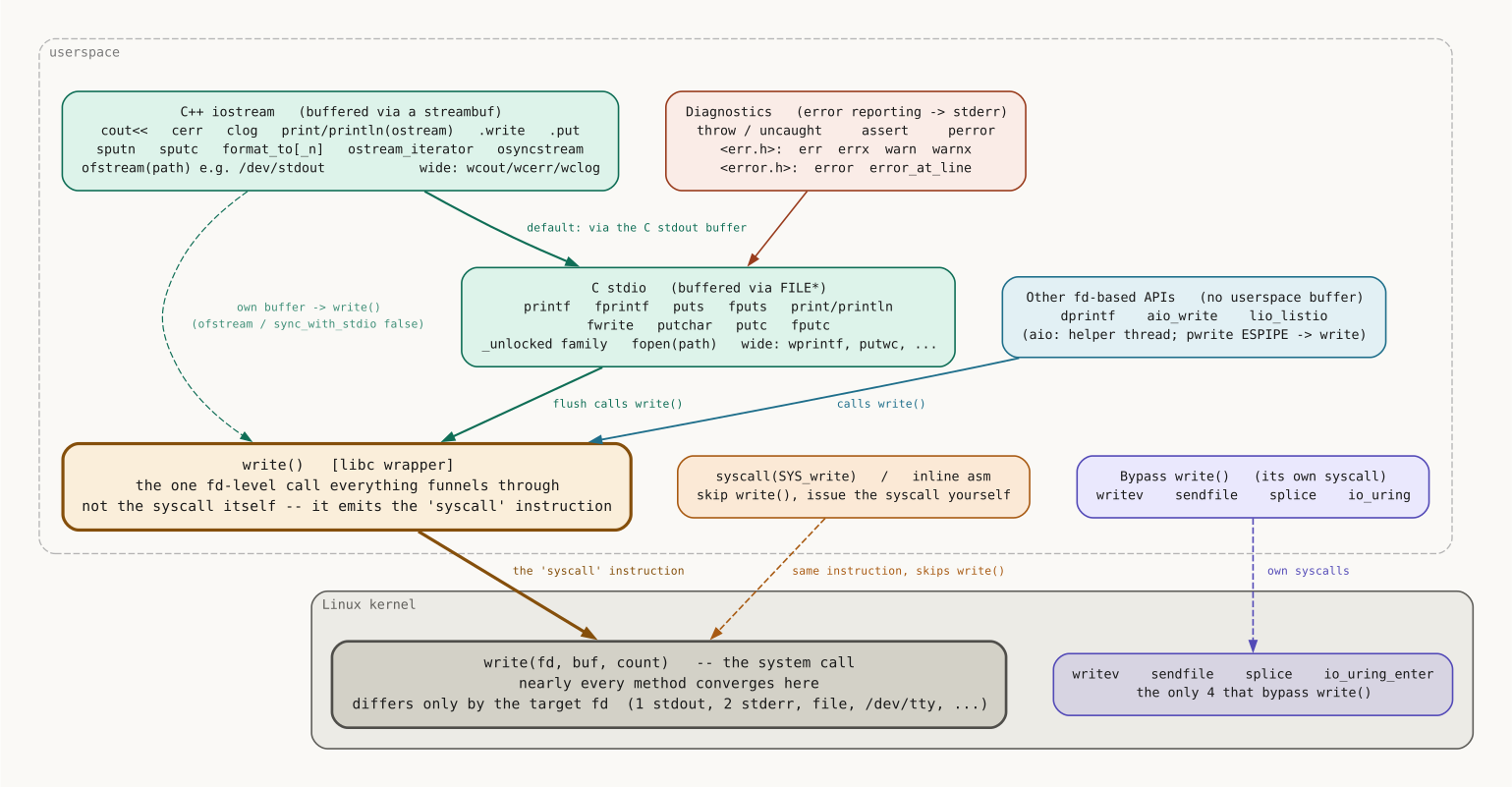
How many buffers between you and the kernel
A separate topic with a lot of confusion around it: how many buffers stand between the call and the kernel:
| Method | Buffering | When write(2) actually happens |
|---|---|---|
write, writev, dprintf, syscall, asm, /dev/tty | none | immediately, on every call |
C stdio: printf, fprintf, puts, fputs, fwrite, putchar, putc, fputc, print, println (and the _unlocked twins) | the stdout buffer (FILE*) | to a terminal - on every \n; to a file/pipe - when the buffer is full or on exit |
iostream: cout <<, .write, .put, sputn, sputc, STL iterators | by default - the same stdout buffer; with sync_with_stdio(false) - its own | the same, plus an explicit flush / endl |
In other words, the direct methods write to the kernel immediately, while the buffered ones flush either on \n (to a terminal), or when the buffer fills up, or during a normal exit from the program (exit flushes all the stdio buffers and runs the destructors of the static cout).
I’d also like to tell you about a nuance with cerr and clog (#24 and #25). It’s commonly believed that cerr is unbuffered and clog is buffered.
std::cerr has the unitbuf flag set, so it flushes after every output operation. std::clog doesn’t have this flag. You’d think clog would accumulate output, but by default (sync_with_stdio(true)) both streams write to the C stderr, which is itself unbuffered. So on POSIX platforms both actually write immediately. I checked via strace (the line "Hello" << " " << "World" << "\n" is 4 operations):
| |
The difference appears only if you detach iostream from stdio:
| |
Now clog really does accumulate everything in a buffer and flush it with a single write at the end, while cerr, because of unitbuf, still flushes on every operation.
In the end, if you run the write-based methods, strace -e write shows the same result everywhere, up to the descriptor:
| |
Even an uncaught throw (#41) ends up simply writing to stderr: (write(2, "terminate called…", 48), then write(2, "Hello World", 11)).
And that’s the way it is, folks. So I don’t understand people who say C++ is bloated. It’s all very simple and concise.